Quick answer
- If your ship takes too much damage, check Hull. If it survives but fights drag on, check Damage. Use Movement for slow getaways and Steer when wide turns cost you shots.
- After claiming the LongCannon, equip it in a compatible slot under Port → Customization. Check the slot name before you leave.
On this page
Choose your next upgrade
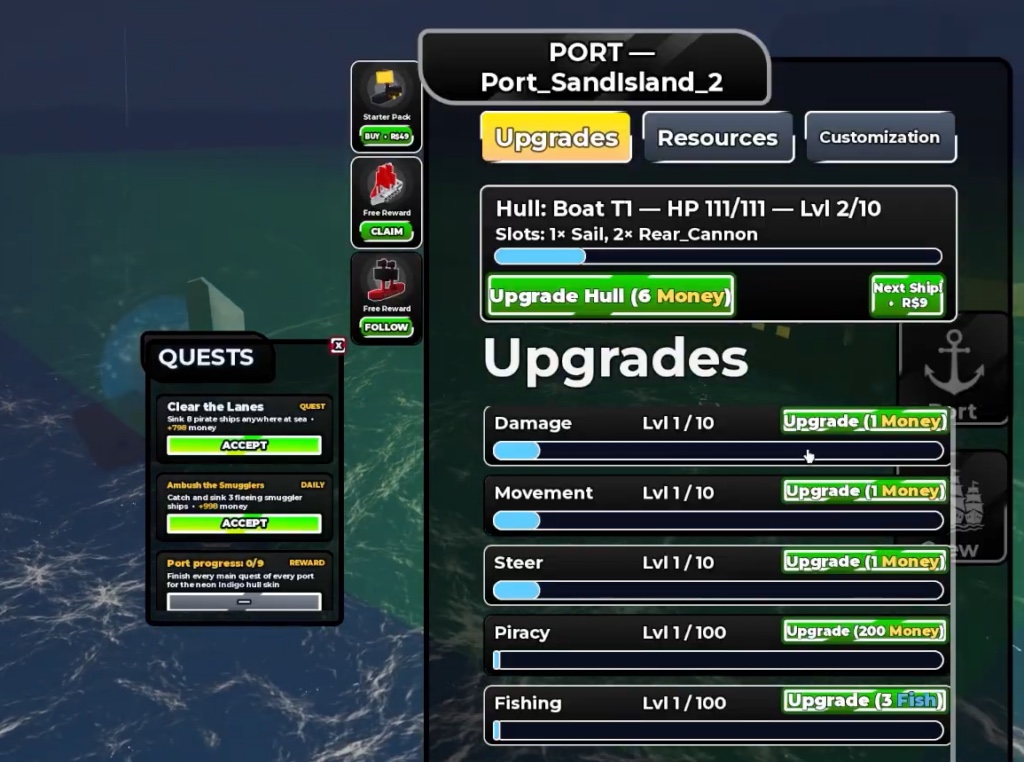
At a port, open Upgrades and choose one problem to fix. Use your last manageable fight as the comparison.
| What happened | Check at port | Check next time |
|---|---|---|
| Hull HP ran low before the fight ended | Hull | The hull level or maximum HP rises. You have more room to take hits. |
| You landed shots but the fight took too long | Damage | Compare how quickly a similar target loses health when shots connect. |
| You struggled to close distance or pull away | Movement | Try the same short approach or retreat with the upgraded ship. |
| Turning wide kept your cannons off target | Steer | Check whether a similar turn brings your weapons back toward the target sooner. |
Check the cost and result
The early sail-era hulls recorded in the community index are Boat (T1), Skiff (T2), Sloop (T3), Cutter (T4) and Schooner (T5). Compare the hull’s slots and on-screen requirements before moving up. Some later hulls list a rebirth requirement.
- Read the row’s cost and current level. If it asks for a resource you lack, check the Resources tab and the current buy price before spending.
- Upgrade one row you can afford. Check that its level changed. If you upgraded the hull, check its HP and slot labels too.
- Take another short fight near port. If the same problem persists, distinguish missing shots from low damage, or a slow turn from a slow retreat.
Fit the LongCannon
- If the LongCannon is missing, check Supporter and the reward items before trying another slot.
- If the weapon is in your inventory but the slot stays unchanged, check that the current hull has a compatible slot.
- If you have the cannon equipped but shots fail to connect, bring the side carrying the cannon toward the target and look for a steady lock. Some cannon types need longer to fire.
- Claim the Supporter reward on the Roblox account you play on. The reward lists the LongCannon and 1,000 doubloons.
- At port, open Customization and select a compatible cannon slot. The starter Boat screenshot shows two Rear_Cannon slots. Use the slot labels on your own hull.
- Select LongCannon, then reopen the slot and confirm that the equipped name changed. Test it on a manageable target before taking a longer trip.